




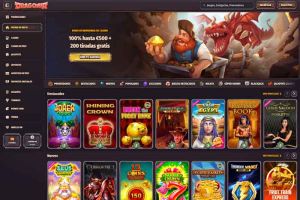
Mobile browsing makes it easy to compare casino promotions while travelling, waiting or relaxing at home, but a small screen can hide important conditions. The dragonia online platform is described as a responsive website rather than a confirmed native app, so readers should assess both the mobile experience and the actual requirements attached to any promotion. In particular, a search for casinos with no deposit bonus should not be treated as proof that a free offer is available. The New Zealand-facing information reviewed describes a deposit-based welcome promotion, not a no-deposit reward.
Start by separating mobile access from bonus eligibility
A responsive website can be opened through a mobile browser without installing a separate Android or iOS application. The available information says the site provides access to casino games and account functions through a mobile browser, and it includes a Create Shortcut option. That shortcut simply places a convenient icon on the device; it does not confirm that a native app has been installed or that a dedicated app exists.
This distinction matters when comparing casinos with no deposit bonus offers. Mobile convenience and promotional eligibility are separate questions. A website may load well on a phone while its welcome promotion still requires a qualifying deposit, identity checks, specific games or a limited claiming period. A shortcut also does not change the promotion’s terms, provide special mobile-only eligibility or remove any account requirements.
Before spending time on a mobile registration form, check the current promotion page and the account’s own terms. The reviewed New Zealand offer requires a first deposit for its advertised match and spins, while a separate pick also has a deposit condition. No general no-deposit bonus was confirmed in the available information. If a promotion is described differently on a third-party page, rely on the operator’s stated conditions rather than the headline alone.
What should you inspect on a small screen?
Mobile layouts can make important details less visible. Promotional pages may place wagering rules, expiry periods, contribution rates and maximum bets below the main headline. Open the complete terms rather than relying on a banner that mentions spins or a matched amount. If the page uses expandable sections, open each one before activating anything.
For the reviewed welcome offer, the conditions include a first deposit of at least NZ$40 for the match and 200 spins, while the separate Bonus Crab pick requires at least NZ$20. The match carries wagering of 35 times the combined deposit and bonus. Winnings from the bonus spins have a separate 40-times requirement, and both requirements must be completed within 10 days of activation.
Other details can be easy to miss on a phone. The spins are released in ten daily batches of 20, with each batch available for 24 hours. The maximum permitted bet during the active bonus is NZ$10. Neteller and Skrill deposits are excluded, and withdrawing before claiming or while the offer is active can void eligibility. These are not characteristics of a no-deposit offer; they are conditions attached to a deposit promotion.
Use a simple mobile check before claiming
A short checklist helps prevent an appealing banner from becoming an unexpected commitment. First, confirm that the offer is visible for the intended New Zealand account. Then check the qualifying deposit, the activation process, the expiry period and whether the promotion must be claimed before betting with the deposit. Keep the page open until the relevant conditions have been read.
- Confirm the offer type: establish whether it is genuinely no-deposit or requires funds first.
- Check the time limit: note when activation begins and when spins or wagering must be completed.
- Review excluded methods: a payment method shown in the cashier may not qualify for a particular promotion.
- Check the maximum bet: exceeding it can affect bonus eligibility under the stated rules.
- Record the conditions: save a screenshot or note the key terms, including any game contribution limits.
After activating a promotion, use the Profile/My Bonus area to check whether it is active and whether progress is displayed. Avoid switching between several offers without understanding the effect of cancellation. The available terms say cancelling an active bonus removes the remaining casino bonus balance and may affect associated winnings. If the mobile page is unclear, ask support before placing qualifying bets.
Keep mobile browsing secure and reliable
A phone is convenient, but it is also easy to use on shared Wi-Fi, with an outdated browser or while logged into several accounts. Use the latest supported version of Google Chrome, lock the device with a passcode or biometric control, and avoid saving casino credentials on a public or shared handset. Never enter account details after following an unexpected message or advertisement.
The site recommends the latest version of Google Chrome and suggests clearing browser cache and cookies when technical login problems occur. Those steps may help with a stuck page, but they should be carried out carefully. Clearing data can remove saved sessions and preferences, so make sure the registered email and password are available before doing it. Do not create another account simply because the first login is inconvenient.
For broader advice on protecting accounts and devices, readers can consult New Zealand’s official cyber-security guidance. It is useful to check the address bar, use a private connection and keep operating-system updates current. Encryption claims do not remove the need for good personal security. If a phone is lost, change the password promptly and contact support about access concerns.
Decide whether mobile convenience is worth the conditions
Mobile access is most useful when it improves browsing and account management without encouraging rushed decisions. A responsive site may suit someone who wants to read promotion terms, check bonus progress or contact support from a phone. It is less suitable for making a quick claim without first understanding wagering, expiry and withdrawal implications.
Consider whether the promotion matches the way you intend to use the account. A genuine no-deposit bonus normally means no qualifying deposit is needed, but the information reviewed does not confirm one here. The documented welcome offer requires a deposit and imposes several conditions. If avoiding an initial payment is important, do not treat free spins, a sign-up banner or a mobile shortcut as evidence of no-deposit eligibility.
It is also sensible to check practical account requirements before making a decision. Full access requires an account using accurate personal details, and verification may involve proof of identity, age, address or payment ownership. Restrictions can apply until checks are complete. Read the current operator terms on the device you plan to use, and contact support if the mobile promotion page differs from the conditions shown in the account.
Mobile bonus questions answered
Is a mobile shortcut the same as a casino app?
No. The available information describes a browser shortcut that opens the website, not a confirmed native Android or iOS application. It may make access more convenient, but it does not establish app-store availability, special app features or different promotional terms. Use a current supported browser and review permissions before saving the shortcut.
Does the advertised welcome offer count as no deposit?
No. The reviewed New Zealand welcome promotion requires a qualifying first deposit for the match and spins, while the separate pick also requires a deposit. It should therefore be treated as a deposit-based offer. No confirmed general no-deposit bonus was identified, so check the current terms before relying on that description.
Can I claim a promotion from my phone?
The platform information says bonus activation and progress are managed through the Profile/My Bonus area, and the responsive website supports mobile browsing. However, claiming depends on the offer’s conditions, account status and verification requirements. Read the full terms on the mobile page first, then contact support if activation or eligibility is unclear.